
Introduction to building a website
Building a website may seem like a daunting task, but it doesn’t have to be. Whether you’re launching a personal blog, an online portfolio, or a small business site, the process can be exciting and rewarding. With countless tools and resources available today, anyone can create an impressive online presence without needing to master coding or design.
Have you ever wondered what goes into crafting that perfect website? From understanding your goals to choosing the right platform—like Squarespace or WordPress—to selecting eye-catching templates that reflect your style, each step plays a crucial role in bringing your vision to life. Get ready to dive into this step-by-step guide that will transform your ideas into reality!
Understanding your purpose and target audience
Before diving into the design and layout, take a moment to reflect on your website’s purpose. What are you trying to achieve? Whether it’s sharing knowledge, selling products, or creating a community, clarity in your mission is essential.
Next comes understanding who will visit your site. Who is your target audience? Define their demographics: age, interests, and needs. This insight helps tailor content that resonates with them.
Create user personas to visualize this audience. Identify their pain points and what solutions you can provide.
The more specific you are about these aspects, the better equipped you’ll be to craft a compelling experience that keeps visitors engaged and returning for more. Knowing both purpose and audience sets the foundation for everything else that follows in building an effective website.

Choosing the right platform for your website (WordPress, Wix, Squarespace)
Selecting the right platform can make or break your website. Each option has its strengths.
WordPress is renowned for its flexibility and extensive plugin ecosystem. It’s ideal for those who desire complete control over their site and don’t mind a steeper learning curve.
Wix offers an intuitive drag-and-drop interface, perfect for beginners. Its templates are visually appealing, making it easy to create a stunning website without technical know-how.
Squarespace stands out with beautiful designs tailored for creatives. If you’re focused on aesthetics and want built-in e-commerce features, Squarespace might be your best bet.
Consider what you value most: customizability or ease of use? Think about whether you need advanced functionalities or simply want to showcase your work beautifully online. Your choice will shape not just the look but also the performance of your website.
Registering a domain name and hosting plan
Registering a domain name is your first step towards establishing an online identity. It’s more than just a web address; it represents your brand. Choose something memorable and relevant to your content.
Once you have the perfect name, you’ll need a hosting plan. This service stores your website’s files and makes them accessible on the internet. There are many options available, ranging from shared hosting to dedicated servers.
Consider factors like speed, security, and customer support when selecting a host. Some platforms even offer integrated solutions for ease of use.
With platforms like Squarespace or Wix, you can often bundle domain registration with hosting services. This simplifies the process considerably while ensuring everything works seamlessly together.
Take time during this phase; it sets the foundation for everything that follows in building your website.
Designing your website: themes, layouts, and customization options
Designing your website is where creativity meets functionality. The right theme sets the tone for your entire site, influencing first impressions.
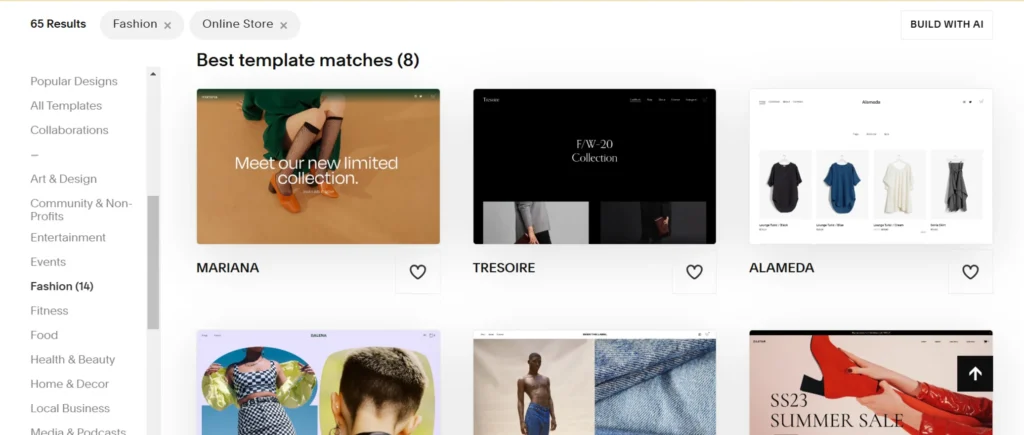
Platforms like Squarespace offer a myriad of templates to choose from. Each template comes with unique layouts that cater to different industries and purposes. Whether you’re building an online store or a personal blog, there’s something for everyone.
Customization options are crucial in making your website stand out. Adjust colors, fonts, and images to match your brand identity seamlessly. Don’t hesitate to play around with spacing and alignment — small tweaks can make a big difference.
Remember that user experience matters too. Ensure navigation is intuitive; visitors should find what they need without hassle. Engaging design combined with practical layout choices will keep users coming back for more!
Adding content: text, images, and videos
Content is the heart of your website. It tells your story and engages your audience. Start with text that’s clear and concise. Use headlines and bullet points to make it scannable.
Images add life to your pages. Choose high-quality photos that resonate with your message. They should enhance, not distract from, the written content.
Videos are a powerful tool for storytelling. A short introduction or tutorial can captivate visitors effectively. Ensure they load quickly; no one likes waiting.
Don’t forget about accessibility! Use alt text for images so everyone can understand what they depict, regardless of ability.
Regularly update this content too. Fresh information keeps visitors returning and boosts SEO rankings as well! Keep experimenting with formats until you find what best connects with your target audience’s needs.
Optimizing for SEO (Search Engine Optimization)
Optimizing for SEO is essential for making your website visible. It ensures that search engines can find and rank your site effectively.
Start with keyword research. Identify words that resonate with your audience and relate to your content. Incorporate these keywords naturally throughout the text, headings, and meta descriptions.
Next, focus on site structure. Use clear URLs and a user-friendly navigation system for better crawling by search engines.
Don’t forget about images. Optimize them with alt tags and descriptive filenames to enhance accessibility and improve rankings.
Additionally, create quality content regularly. Engaging articles attract visitors while encouraging backlinks from other reputable sites.
Ensure your website loads quickly on all devices. A fast-loading site keeps users happy and decreases bounce rates—factors critical for SEO success.
Testing and launching your website
Testing your website is a crucial step before going live. Start by checking all links to ensure they’re functional. Dead links can frustrate visitors and hurt your rankings.
Next, review the site’s responsiveness on various devices. Your design should look great on desktops, tablets, and smartphones alike.
Don’t forget about loading speed. A slow website can turn users away quickly. Use tools like Google PageSpeed Insights to identify areas for improvement.
Ask friends or colleagues to navigate your site as if they were new visitors. Their feedback can reveal issues you might have overlooked.
Once everything checks out, it’s time for launch day! Share your exciting news across social media channels and other platforms where your audience hangs out. This initial push helps gather early traffic and engagement right from the start.r their experience better and optimize conversion rates over time.
With these strategies in mind, you’re well-equipped not just to build but also enrich a vibrant online presence using Squarespace.
Maintaining and updating your website
Once your website is live, the work doesn’t stop. Maintaining and updating your website is crucial for keeping it fresh and relevant. Regular updates can improve user experience, enhance SEO rankings, and ensure security.
Start by routinely checking for broken links or outdated content. This not only helps with navigation but also maintains credibility with your audience. If you’re using templates from a website builder like Squarespace, they often provide built-in tools to simplify this process.
Content should be updated regularly to reflect current trends or information in your niche. Consider adding blog posts, new images, or videos that engage visitors and encourage them to return.
Don’t forget about design updates too! As aesthetic preferences change over time, refreshing the look of your site can attract new users while retaining existing ones. Adjust themes and layouts as necessary to keep things visually appealing.
Always back up your site before making significant changes. This ensures that you can easily restore previous versions if something goes awry during an update.
By committing to regular maintenance and updates on platforms like Squarespace or other website builders, you’ll create a dynamic online presence that resonates with both old visitors and newcomers alike.